|
1)
My Undercabinet Light won¡¯t turn on when I
approach it. What can I do to fix it?
The center picture
on back of the packaging shows the correct way
to install the Light. The product only works at
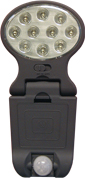
night time. The motion sensor should be facing
the way to detect motion and the switch should
be in ¡°auto¡± position. In this setting, the
light will not turn on during day time. If
another light source is detected nearby, the
Light will also not turn on properly.
2)
What kind of batteries can I use for this
product?
This product uses 3
AA Alkaline or Rechargeable batteries. All
batteries must be new with the same brand.
Batteries must align correctly according to
polarity shown on the outside of the battery
compartment. Do not mix old with new batteries
or different brands because that could effect
the operation of the Light.
3)
The Light turns on too soon or too late. What
can I do to reduce the sensitivity?
Rotate the motion
sensor downward (as shown in back of package).
At this setting, the Light will turn on approx.
2 feet away. Alternatively, reposition the Light
closer to the wall so that the Light may turn on
less than 2 feet away. Furthermore, you can
rotate the light in the opposite direction with
the motion sensor facing the wall so that the
light won¡¯t turn on unless you wave your hand
underneath the light. Make sure the motion
sensor is facing upward in same direction like
the photosensor.
4)
Can I install the Undercabinet Light directly
above the stove? Is it safe?
Plastic appliances
are not heat resistive and may melt away with a
temperature of 221 F¡ã. Batteries may also be in
danger within a temperature of 130 F¡ã degrees.
Do not install the Light directly above the
stove. Install the Light as far away as possible
from the stove.
5)
These are not the correct screws for the Light ¨C
a little too big.
First, you can force
about half way of the screw into the surface of
installation and then remove it. Use pliers to
cut the screws to the desired length before
forcing the screw all the way in.
6)
When do the batteries wear out? Is there a
signal indicator to replace the batteries?
Depending how often
you use the Light, the batteries can last up to
6 months. It is common sense to change the
batteries when the light intensity is low. When
the Light flashes on/off or become very dim,
that means the battery is low and it needs
replacing.
7) Can I use rechargeable batteries for this
product?
You could but the
light itself doesn¡¯t come with a battery charger
and the battery will not be charged at the same
time when they are used.
8)
Can I install the product anywhere besides the
kitchen?
Our product can be
installed almost anywhere light is needed.
9)
Can I use this product anywhere outdoors?
Please do not
install this product outdoors because it is not
weather-resistant.
10)
Does the product cause any interference to other
appliances near by?
Please read the
instruction manual for the FCC part. It states
that the product was tested and found within the
limits of a Class B digital device pursuant to
Part 15 of the FCC rules. These limits provide
reasonable protection against harmful
interference in a residential installation.
However, there is no guarantee that interference
will not occur in a particular installation.
This product can generate radio frequency and if
not installed properly or used in accordance to
the instructions, the product may cause
interference to radio communications. If
interference does occur to radio or television
reception, which can be determined by turning
the equipment off and on, the user should follow
these guidelines to fix the problem.
(A) Adjust or
relocate the receiving antenna of the equipment
(radio or tv).
(B) Increase
distance between the equipment and receiver (undercabinet
light).
(C) Connect the
equipment into a different outlet on a different
circuit from the receiver
(D) Consult the
dealer or an experienced radio/TV technician for
help.
11)
My undercabinet Light will turn on and off
sometimes evem I have new batteries just
installed. What can I do to fix it?
It¡¯s possible that
you may need to reset your light. The procedure
is similar to rebooting up your computer.
Put 3 pieces of
black electrical tape on the photosensor (shown
in the front of the packaging). Make sure it is
securely tight with no air bubbles showing.
Hook up the Light
underneath your cabinet or where you had it
installed.
Turn the Light ON
and then OFF ¨C do this process for 3 times.
Make sure the motion
sensor is facing downward in same direction as
the 13 LED lights.
Switch the Light to
AUTO.
The Light will turn
on for approx. 1 minute. Step back at least 15
feet away and wait for the light to turn off. Do
not move ¨C keep steady or else Light will not
turn off.
When the Light turns
off, walk towards the Light slowly waving your
arms.
The motion sensor
should pick up your movement and the Light
should turn on.
This completes the
resetting process. Remove the black tape.
¡¡ |